The Facebook integration requires a Facebook Application ID. You can create a Facebook app from Meta for Developers and copy the Application ID into Makappi.
How to get your Facebook Application ID
- Go to developers.facebook.com and log in with your Facebook account.
- Open My Apps. If you already have a Facebook app for your store, select it and go directly to step 5.
- If you do not have an app yet, click Create App, choose the Business app type, then continue.
- Enter your app display name and contact email. Select a Business Account if needed, then create the app.
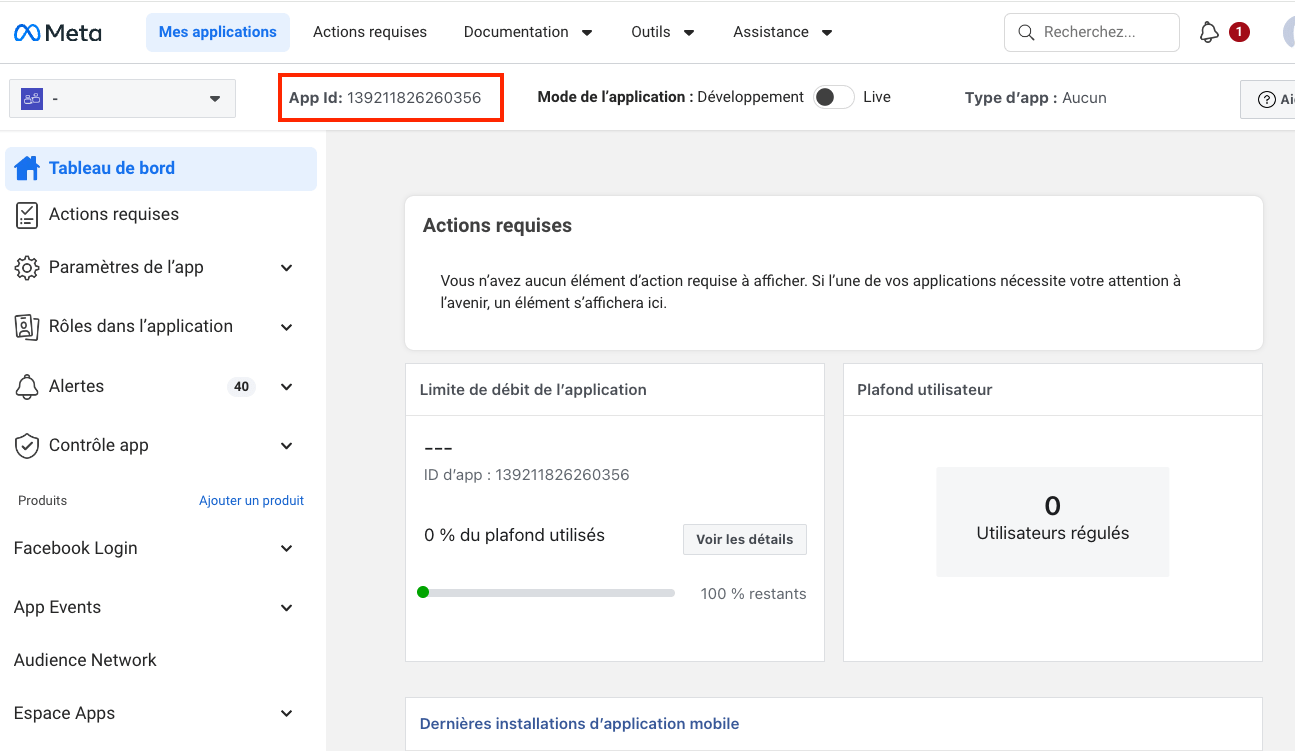
- Copy the App ID displayed at the top-left of the Facebook app dashboard, then paste it into the Facebook integration in Makappi.
- In the left menu, go to Settings > Basic.
- Fill in the required basic settings, especially the Privacy Policy URL and Category, then save your changes.